
Useful Links - BMI160 Setup



Table of Contents
[Sticky]


BMI160 sensor setup
The BMI160 sensor has 12 pins, as shown in the picture below. To use it, connect the VIN pin to a 3.3V signal, the GND pin to ground (0V), the SCL pin to the I2C clock, and the SDA pin to an I2C data pin. For example, refer to the NVIDIA Jetson Nano Developer Kit's Expansion Header Connections in the second image below. The connections should be made in this case, as illustrated in the last image.
To access the I2C bus, the user needs to have the right permissions. Run the following command to include the current user in the I2C group.
sudo usermod -aG i2c $USER
Reboot the board to apply the change.
 | NOTE: Its I2C address can be found on bus number 7 (Jetson Nano and Jetson AGX Orin) or 8 (Jetson Xavier NX) and the 0x69 address. The bus number can be found in the 40-pin header description for the platform (NVIDIA case). |
-
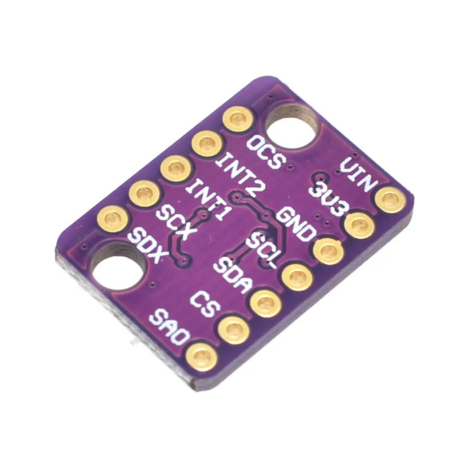 BMI160 sensor (taken from here).
 -
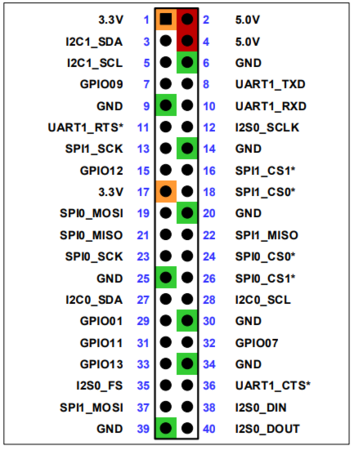 Expansion Header Connections of a Jetson Nano (taken from here).
 -
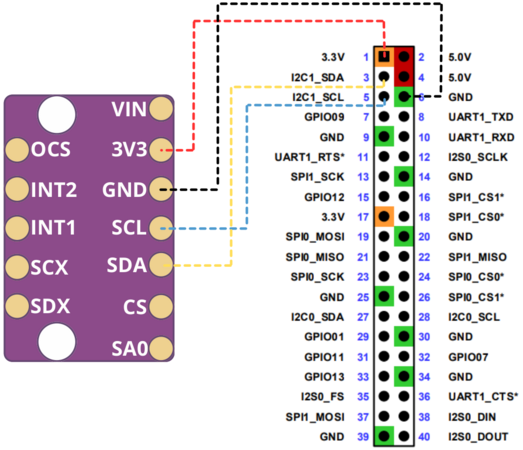 Connection of a BMI160 sensor.


